
Assume the computer is compromised
Most thefts of crypto do not break cryptography. They start on an ordinary computer. AirNox Wallet is designed for that computer, and it works on the assumption that the computer is already lost.
On this page
The threat is the machine, not the maths
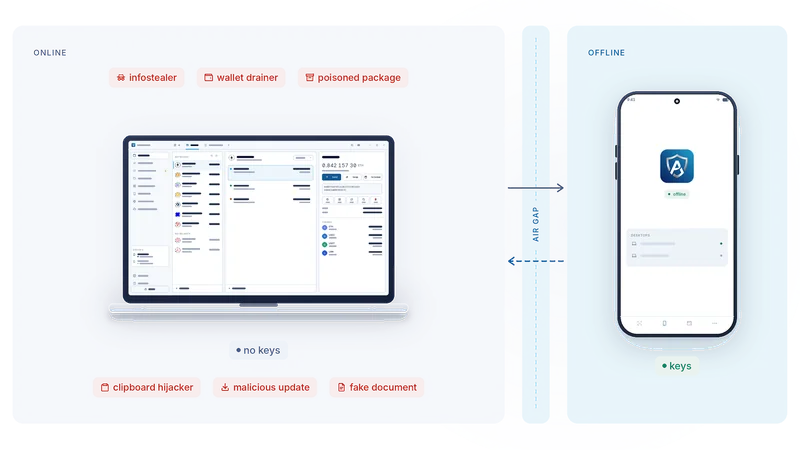
Think about how funds actually leave a wallet. A package in a developer's toolchain carries something extra. A browser extension ships an update nobody read. A document is not a document. A web page shows one transaction and asks you to sign another. A clipboard tool swaps an address a moment before you paste it.
None of these attacks touches the cryptography. Each one needs the same thing: a private key, or your approval, on a machine that is connected to the internet. The computer is the target because the computer is where the key lives.
So the first design decision in AirNox Wallet is simple. Do not let the key live there.
Keys off the computer
AirNox Wallet runs on the desktop. On its own it is a complete native wallet, with the seed sealed in its vault, and that is a sound setup for everyday operations. In AirGap mode it goes one step further: it never holds a key that can move your funds. It holds only the addresses you chose to show it. With those it does everything a wallet does online: it talks to the network, reads balances and history, builds unsigned transactions, screens them, and broadcasts whatever comes back signed.
The signing happens on AirNox Vault, an app on an Android phone that never goes online. It holds the seeds. It decodes every request from the bytes it is about to sign, shows the operation, the amount, the parties and the network, and signs only after you press Accept.
Between the two is an air gap. The phone has no route to the internet, and the only things that ever cross are a request going one way and a signature coming back.
What each hop does
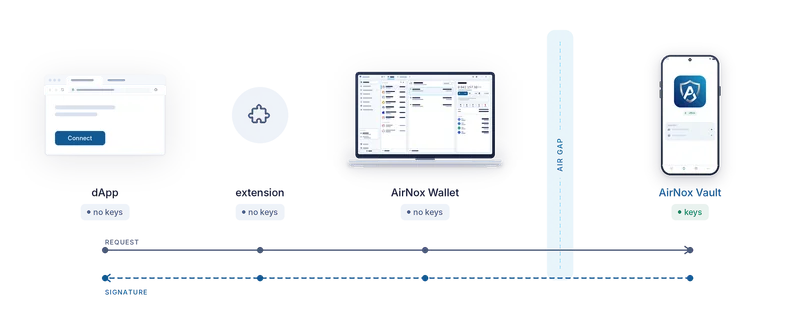
A request can start on a web page, in the wallet itself, or from an AI agent connected to the wallet. Wherever it starts, it travels the same path.
The browser extension speaks the standard wallet interfaces that websites expect. It holds no keys and signs nothing. It forwards the request to the desktop over a local channel.
The desktop decodes the request and screens it. It recognises standard operations, flags anything that merely resembles one, checks allowances and spenders, and builds the unsigned transaction. Then it hands that transaction to the phone over QR codes, Bluetooth LE or NFC.
The phone decodes the request again, from the exact bytes it will sign, and shows it to you in plain words. The desktop's description of the request is a claim. The phone's view is the truth. You read it and press Accept, or you do not. Only the signature goes back.
Where the key lives decides what malware can do
AirNox gives you two levels of protection. It helps to see them next to the weakest common setup: a classic wallet that lives as a browser extension.
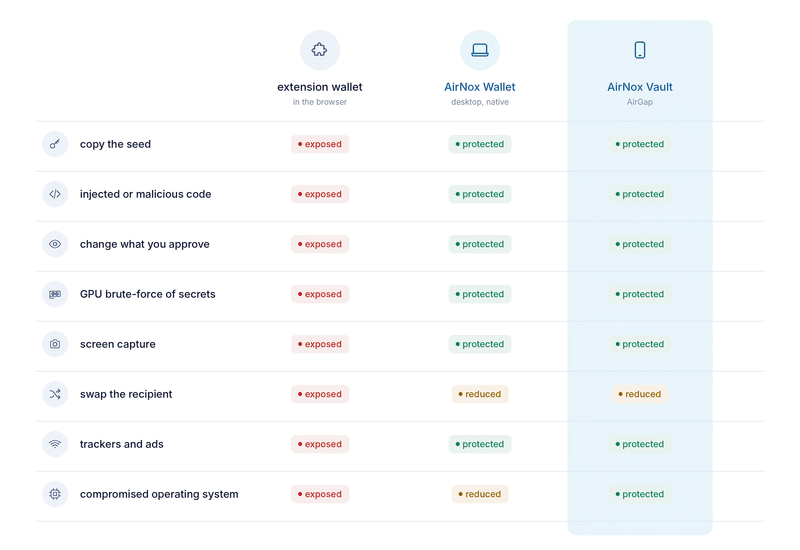
A classic extension wallet runs inside the most exposed program on the computer. Its secrets are sealed with encryption that modern graphics cards brute-force at scale. It can be reached by code injected into a page and seen by anything that captures the screen. It ships trackers and advertising, offers no protection against a swapped address, and consumes resources all day while doing so.
AirNox Wallet on the desktop is a different kind of program, and it defends itself. It is native C++, with no script engine to inject into and no page to poison. It keeps a seed in memory only while it is needed and wipes it straight after. It watches the processes around it and the libraries loaded into it, so foreign code does not run inside the wallet unnoticed. It decodes and screens every request, so what you approve is what you see. It watches the clipboard for a swapped address and keeps its own windows out of screen captures. Its stored secrets are sealed with memory-hard Argon2id and anchored in the computer's TPM 2.0 chip, which graphics cards do not shortcut. And it carries no trackers. For everyday operations it is a sound choice on its own, and every security feature in this series applies to it whether or not a phone is involved.
AirGap is the ultimate layer on top. Everything above still applies, and the seed moves to an offline phone. Even an attacker who owns the whole operating system finds nothing on the computer to copy and no way to alter the screen on which the final decision is made. Swapping the recipient is the one move that stays partly open everywhere, because address poisoning targets your eyes rather than the software. The address pictures on both devices are there to catch it.
What this does not fix
An offline signer shows you the truth about what you are signing. It cannot stop you from agreeing to it. Your seed backup is still your responsibility, on paper or steel rather than in a password manager. And no wallet protects you from someone who makes you unlock it. We would rather you hear the limits from us than discover them yourself.
The rest of this series goes through the parts one by one: why the signer is a phone you already own, the three ways across the gap, how the phone stays invisible on the air, why the transport is never trusted, what the phone shows you, and the record it keeps.
The whole series
- Assume the computer is compromised
- Mass Adoption Security: the signer is a phone you already own
- Three ways across the gap: QR codes, Bluetooth LE and NFC
- Invisible on the air: a signer nobody can scan for
- The transport is never trusted
- What the phone shows you: transaction analysis on the signer
- The phone keeps its own record
- The vault on your desktop: Argon2id and a profile that resists guessing
- dApps without a browser wallet
- An MCP server with rules: AI agents under limits
- One protected wallet for all of it
- Small and native: C++, no JavaScript runtime, from a workstation to a Raspberry Pi