
dApps without a browser wallet
Websites expect a wallet in the browser. The browser is the most exposed program on the computer. AirNox resolves that with an extension that looks like a wallet to the page and holds nothing at all.
On this page
An extension that is not a wallet
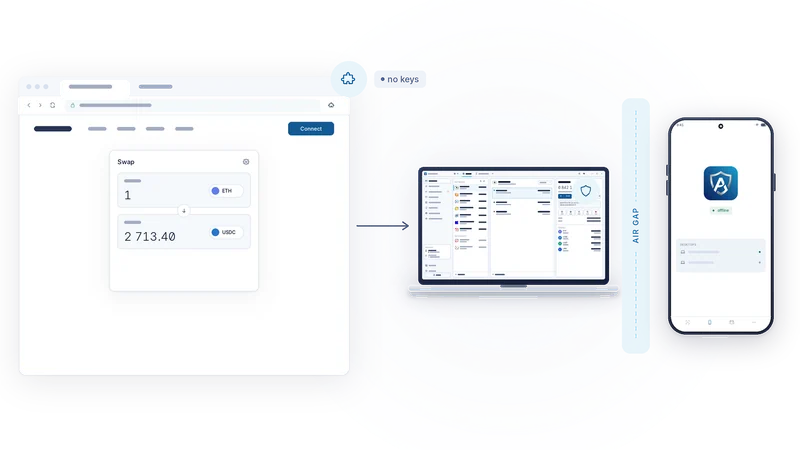
The AirNox browser extension injects the standard interfaces that decentralised applications look for: EIP-1193 and EIP-6963 for EVM networks, TON Connect, and the Solana and Sui wallet standards. To a page, it is a wallet. It answers "which accounts", "which chain", "please sign this" in the usual way.
Internally it is a courier. It holds no keys, it stores no seed, and it cannot sign anything. Every request a page makes is forwarded over a local-only channel to AirNox Wallet on the desktop, and the answer comes back the same way. If the extension were replaced by a malicious copy tomorrow, it would have nothing to steal and nothing to sign with.
What is wrong with a classic extension wallet
A classic web3 wallet lives entirely inside the browser, keys included. That puts the keys in the most exposed program on the computer. Code injected into a page can reach the extension's interface. The stored secrets are protected by encryption that modern graphics cards brute-force at scale. Many ship trackers and advertising. Few offer any protection against a swapped recipient address. And they consume memory and processor time all day for the privilege. AirNox keeps the browser part to a courier and moves everything that matters out of the browser, into a native desktop program, and in AirGap mode onto a phone that is never online.
Local only
The channel between the extension and the desktop never leaves your computer. There is no relay server, no cloud session, no account. The two ends authenticate each other, so a program pretending to be the wallet gets nothing, and a page pretending to be the extension gets nothing either.
The desktop owns the permissions
Permissions live in AirNox Wallet, not in the browser. They are granted per origin and per chain, one at a time, and nothing is implied. A site that was allowed to see your Ethereum account has not been allowed to see your Polygon account. A site allowed on one wallet has not been allowed on another.
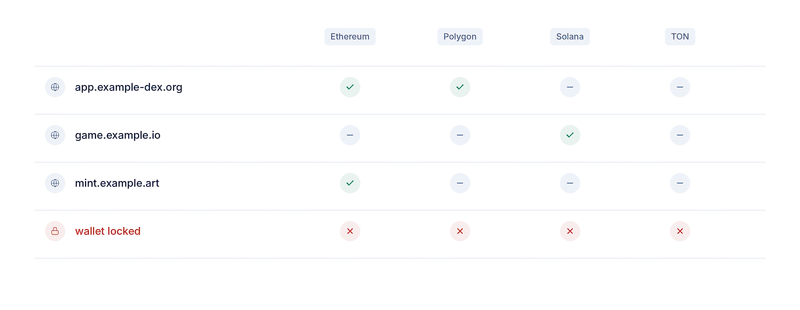
The origin is the one the browser proved, not a string the page sent along. A page cannot claim to be another site. And the whole system is fail-closed: anything not explicitly granted is refused, and a request the wallet does not understand is refused too.
Locked means no
While the wallet is locked, the extension answers nothing, however the request is phrased. A page cannot wake the wallet, cannot enumerate accounts, cannot queue a signature to be made once you unlock. You unlock the wallet yourself, in the wallet, and only then does the browser get answers.
Signing
Transactions, messages and typed data all travel the same path. The desktop decodes and screens the request first, recognising standard operations and flagging look-alikes, unlimited allowances and unknown spenders. In AirGap mode the unsigned request then crosses to the phone, where it is decoded again from the bytes, shown to you, and signed only after you press Accept. The signature comes back, the desktop broadcasts it, and the page receives a transaction hash. Chain switching is handled in the same way, with the wallet deciding whether the switch is allowed.
For a wallet whose seed lives on the desktop, the desktop signs after the same screening, in the wallet window rather than on the phone.
What a compromised page can and cannot do
A compromised page, or a poisoned script inside the browser, can lie to you. It can show one transaction and request another. It can pretend a claim is a verification. What it cannot do is sign. The decision is made where the keys are, after you have read the request as the phone decoded it. A drainer's approval that sails through a browser pop-up arrives on the phone as what it is: an allowance, to this spender, for this amount. If it is unlimited, the phone says so.
That is the trade we wanted: the convenience of a browser wallet for the page, and none of the exposure for you.
The whole series
- Assume the computer is compromised
- Mass Adoption Security: the signer is a phone you already own
- Three ways across the gap: QR codes, Bluetooth LE and NFC
- Invisible on the air: a signer nobody can scan for
- The transport is never trusted
- What the phone shows you: transaction analysis on the signer
- The phone keeps its own record
- The vault on your desktop: Argon2id and a profile that resists guessing
- dApps without a browser wallet
- An MCP server with rules: AI agents under limits
- One protected wallet for all of it
- Small and native: C++, no JavaScript runtime, from a workstation to a Raspberry Pi