
The phone keeps its own record
When something looks wrong, you want a record you can trust. The desktop's history is kept on the machine we assume is compromised. So the phone keeps its own.
On this page
Why the signer keeps a journal
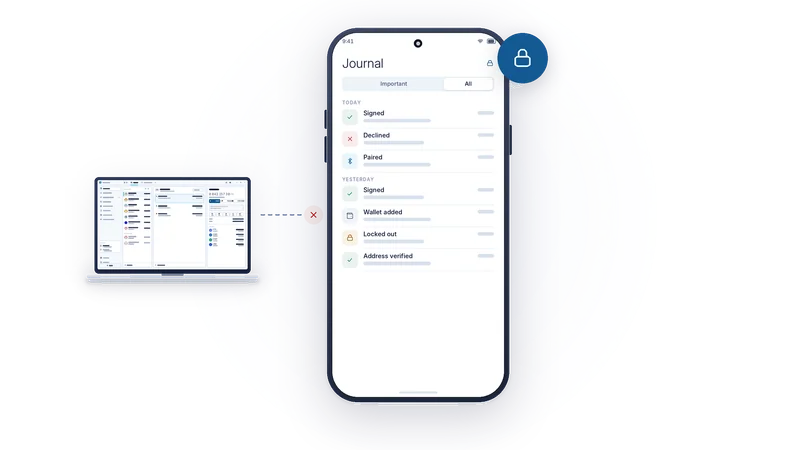
An offline signer is the one device in the setup whose state you can believe. It makes sense for it to remember what it did. AirNox Vault keeps a durable, encrypted journal of every decision made on the phone: what was asked, what you were shown, and what you decided. It is the signer's own account of events, independent of anything the desktop records.
If a transaction you do not recognise appears in your history, the journal tells you whether this phone ever signed it. If a desktop claims to be paired, the journal tells you when that pairing happened and over which carrier. If someone tried passwords on the phone while you were away, the journal says so.
What goes in
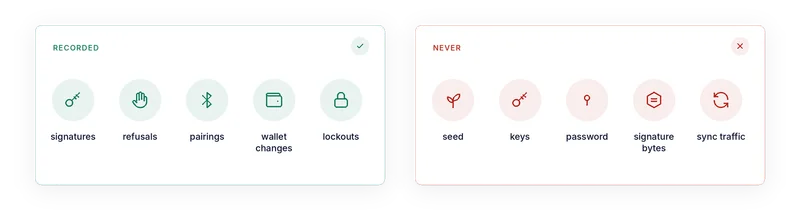
Every signature, with its outcome: signed, failed, declined, expired, withdrawn by the desktop. Every message signature, because a signed message can authorise as much as a transaction. Every pairing with a desktop, and every time one was forgotten. Every wallet you shared with a desktop, created, imported, renamed or deleted. Every address you verified on the phone's screen. Every lockout after repeated wrong passwords.
Each entry keeps what you need to recognise the action: the wallet, the desktop it came from, the carrier, the network, the recipient, the amount, and the findings you were shown at the time.
What never goes in
No key, no seed, no recovery phrase, no password, no signature bytes, and nothing that could be used to derive any of them. The journal records that you signed, not the signature. It also leaves out the technical noise: sync traffic, address batches, link up and link down, transport faults. Those are not decisions, and a journal full of them would hide the entries that matter.
Written before the signature
The order of operations is deliberate. When you press Accept, the phone first writes the approval to the journal. Only then does it sign. If the journal entry cannot be written, nothing is signed, the desktop is told the request could not be carried, and the screen tells you why.
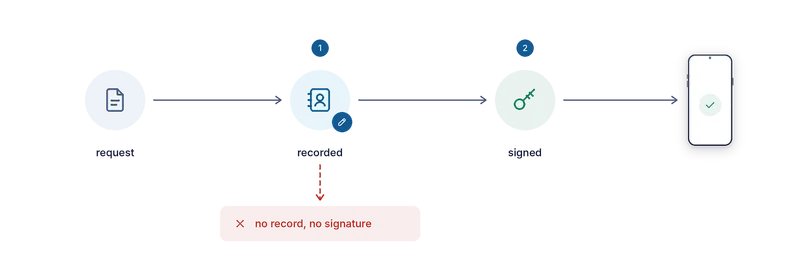
This means the journal can never be missing a signature that happened. There is no window in which the phone signed and then failed to remember.
Durable
The journal is append-only. Nothing in it is ever edited, and there is no button to clear it. It survives deleting a wallet: the entries from the period that wallet was in use stay, marked as belonging to a deleted wallet. It survives changing the app password. It is encrypted at rest on the phone, sealed with the same care as the seeds themselves.
The size is a setting. You choose how many entries to keep, and when the journal is full the oldest entries give way to the newest. Nothing else ever removes an entry.
Stays on the phone
The journal never leaves the device. It is never exported, never synced, and never shown to a desktop. A desktop cannot ask for it, because there is no request that serves it. You read it on the phone, in the Journal screen, with a filter that shows either everything or only the entries that matter: a key put to use, a change to who may ask this phone for what, a wallet created or removed, or a sign that someone tried to get in.
A record that lives only on the signer, written before every signature, that no other device can read or alter. If you ever need to know what really happened, this is where you look.
The whole series
- Assume the computer is compromised
- Mass Adoption Security: the signer is a phone you already own
- Three ways across the gap: QR codes, Bluetooth LE and NFC
- Invisible on the air: a signer nobody can scan for
- The transport is never trusted
- What the phone shows you: transaction analysis on the signer
- The phone keeps its own record
- The vault on your desktop: Argon2id and a profile that resists guessing
- dApps without a browser wallet
- An MCP server with rules: AI agents under limits
- One protected wallet for all of it
- Small and native: C++, no JavaScript runtime, from a workstation to a Raspberry Pi